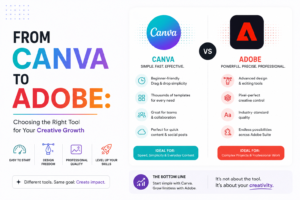
 Canva vs Adobe in 2026 is one of those debates that comes up in almost every conversation I have with new clients — and honestly, it’s the wrong question most of the time.
I’ve had clients come to me completely convinced that Adobe was overkill for their needs. I’ve had others convinced that Canva was “just for beginners” and that using it made them look unprofessional. Both groups were wrong in their own way.
The truth is that neither tool is universally better. They’re built for different things, different people, and different stages of a brand’s growth. The right answer depends entirely on who you are, what you’re making, and how much time and budget you’re working with.
I use both. Every week. For different clients and different purposes. And after years of working with brands across industries, I’ve built a pretty clear picture of when each one wins — and when it doesn’t.
Let me break it all down for you.
First — Why This Decision Actually Matters
Choosing the wrong design tool doesn’t just slow you down. It affects the quality of your output, the consistency of your brand, and how efficiently your team can create content at scale.
A small business owner trying to manage their own social media in Adobe Illustrator without design training is going to spend three hours making something a Canva template could produce in twenty minutes. On the flip side, a professional designer trying to build a complex brand identity system inside Canva is going to hit a wall fast.
The best design tools for social media are the ones that match your skill level, your workflow, and your output requirements — not the ones with the most impressive feature list.
So let’s look at both honestly.
Canva in 2026 — More Powerful Than You Think
Canva for business has come an incredibly long way from the basic drag-and-drop tool it started as. In 2026, Canva is a genuinely powerful platform with features that would have seemed impossible five years ago.
Here’s what Canva does really well:
Speed and accessibility. If you need to produce a lot of content quickly — social media posts, stories, carousels, email headers, presentations — Canva is hard to beat. The template library is enormous, the interface is intuitive, and you don’t need any design training to produce something that looks clean and professional.
Brand Kit functionality. Canva’s Brand Kit feature lets you lock in your brand colors, fonts, and logos so that anyone on your team can create on-brand content without a designer in the room. For small businesses and growing teams, this is genuinely powerful.
Collaboration. Canva’s real-time collaboration has become one of its strongest features. Multiple team members can work on the same design simultaneously, leave comments, and approve content — all without sending files back and forth.
AI-powered features. In 2026, Canva has deeply integrated AI tools — background removal, image generation, text-to-image, and smart resize that automatically adapts your design to every platform format in one click. These features alone have saved my clients hours every week.
Where Canva falls short: Custom typography control is limited. Complex illustrations and detailed vector work are frustrating. If you’re building something that requires precise, layered design work — packaging, detailed infographics, brand identity systems — Canva starts to feel like you’re trying to paint a mural with a house paintbrush.
Adobe in 2026 — The Professional Standard That Earns Its Price Tag
Adobe for designers remains the industry standard for serious creative work — and in 2026, the Adobe Creative Cloud suite has only gotten more capable.
Here’s what Adobe does better than anything else:
Precision and control. Whether you’re in Illustrator, Photoshop, or InDesign, the level of control you have over every design element is unmatched. Typography, color management, vector paths, layer effects — everything can be adjusted with a level of precision that Canva simply can’t match.
Professional output quality. For print, packaging, brand identity, and high-end marketing materials, Adobe is the only real choice. The file formats, the color profiles, the resolution handling — all of it is built for professional-grade output.
Integration across tools. The Creative Cloud ecosystem means your assets, fonts, and files move seamlessly between Illustrator, Photoshop, After Effects, and Premiere. For brands producing a mix of static and motion content, this integration is invaluable.
Where Adobe falls short: The learning curve is steep. The subscription cost is significant. And for someone who just needs to post consistently on Instagram three times a week, Adobe is almost certainly more tool than they need.
So Which One Is Right for Your Brand?
Here’s the honest answer — and the one that most “Canva vs Adobe” comparisons avoid giving:
Use Canva if: You’re a business owner managing your own social media and you need to move fast without a design background. Your content needs are primarily social media posts, stories, and carousels. You have a team that needs to create on-brand content independently. Your budget is limited and you need maximum output for minimum investment.
Use Adobe if: You’re a professional designer or working with one. Your brand requires complex, detailed creative work — identity systems, print materials, packaging, motion graphics. You need precise color management for professional print output. You’re producing content that requires layered, sophisticated visual work that templates can’t accommodate.
Use both if: You’re a designer or social media manager working with multiple clients at different scales. Adobe handles the high-end creative work — brand identities, detailed graphics, complex illustrations. Canva handles the day-to-day social media content production, team collaboration, and rapid-turnaround deliverables.
This is exactly how I work. Graphic design tools 2026 have evolved to the point where the smart approach isn’t choosing one over the other — it’s understanding which tool serves which purpose in your workflow.
The Middle Ground — What Most Brands Actually Need
Here’s something I’ve noticed working with brands across different sizes and industries: most businesses don’t actually need the full Adobe suite.
What they need is:
A professional to handle the foundational brand design work — logo, color palette, typography system, brand guidelines — using Adobe, where the precision and output quality matter most.
Then a well-built Canva Brand Kit that translates those brand assets into templates their team can use for day-to-day content creation without needing a designer for every post.
This combination gives you professional-grade brand foundations with accessible, scalable content production. It’s the setup I build for most of my clients — and it works incredibly well.
The Canva vs Adobe 2026 debate misses the point when it’s framed as a competition. They’re not competing for the same job. Canva is a content production tool. Adobe is a professional design tool. Both are excellent at what they’re built for.
The question to ask isn’t “which is better?” It’s “which one — or which combination — serves where my brand is right now?”